
Privacy Policy For AlarmPm

Anon3mity built the [AlarmPm] app as a Free app. This SERVICE is provided by Anon3mity at no cost and is intended for use as is.

This page is used to inform visitors regarding my policies with the collection, use, and disclosure of Personal Information if anyone decided to use my Service.

If you choose to use my Service, then you agree to the collection and use of information in relation to this policy. The Personal Information that I collect is used for providing and improving the Service. I will not use or share your information with anyone except as described in this Privacy Policy.

The terms used in this Privacy Policy have the same meanings as in our Terms and Conditions, which is accessible at [AlarmPm] unless otherwise defined in this Privacy Policy.

Information Collection and Use

For a better experience, while using our Service, I may require you to provide us with certain personally identifiable information, including but not limited to none. The information that I request will be retained on your device and is not collected by me in any way.

The app does use third party services that may collect information used to identify you.

Link to privacy policy of third party service providers used by the app

Log Data

I want to inform you that whenever you use my Service, in a case of an error in the app I collect data and information (through third party products) on your phone called Log Data. This Log Data may include information such as your device Internet Protocol (“IP”) address, device name, operating system version, the configuration of the app when utilizing my Service, the time and date of your use of the Service, and other statistics.

Cookies

Cookies are files with a small amount of data that are commonly used as anonymous unique identifiers. These are sent to your browser from the websites that you visit and are stored on your device’s internal memory.

This Service does not use these “cookies” explicitly. However, the app may use third party code and libraries that use “cookies” to collect information and improve their services. You have the option to either accept or refuse these cookies and know when a cookie is being sent to your device. If you choose to refuse our cookies, you may not be able to use some portions of this Service.

Service Providers

I may employ third-party companies and individuals due to the following reasons:

  • To facilitate our Service;
  • To provide the Service on our behalf;
  • To perform Service-related services; or
  • To assist us in analyzing how our Service is used.

I want to inform users of this Service that these third parties have access to your Personal Information. The reason is to perform the tasks assigned to them on our behalf. However, they are obligated not to disclose or use the information for any other purpose.

Security

I value your trust in providing us your Personal Information, thus we are striving to use commercially acceptable means of protecting it. But remember that no method of transmission over the internet, or method of electronic storage is 100% secure and reliable, and I cannot guarantee its absolute security.

Links to Other Sites

This Service may contain links to other sites. If you click on a third-party link, you will be directed to that site. Note that these external sites are not operated by me. Therefore, I strongly advise you to review the Privacy Policy of these websites. I have no control over and assume no responsibility for the content, privacy policies, or practices of any third-party sites or services.

Children’s Privacy

These Services do not address anyone under the age of 13. I do not knowingly collect personally identifiable information from children under 13. In the case I discover that a child under 13 has provided me with personal information, I immediately delete this from our servers. If you are a parent or guardian and you are aware that your child has provided us with personal information, please contact me so that I will be able to do necessary actions.

Changes to This Privacy Policy

I may update our Privacy Policy from time to time. Thus, you are advised to review this page periodically for any changes. I will notify you of any changes by posting the new Privacy Policy on this page. These changes are effective immediately after they are posted on this page.

Contact Us

If you have any questions or suggestions about my Privacy Policy, do not hesitate to contact me at [dev.anon3mity@gmail.com].

Privacy Policy

Tic Tac Go

Anon3mity built the [Tic Tac Go] app as a Free app. This SERVICE is provided by Anon3mity at no cost and is intended for use as is.

This page is used to inform visitors regarding my policies with the collection, use, and disclosure of Personal Information if anyone decided to use my Service.

If you choose to use my Service, then you agree to the collection and use of information in relation to this policy. The Personal Information that I collect is used for providing and improving the Service. I will not use or share your information with anyone except as described in this Privacy Policy.

The terms used in this Privacy Policy have the same meanings as in our Terms and Conditions, which is accessible at [Tic Tac Go] unless otherwise defined in this Privacy Policy.

Information Collection and Use

For a better experience, while using our Service, I may require you to provide us with certain personally identifiable information. The information that I request will be retained on your device and is not collected by me in any way.

The app does use third party services that may collect information used to identify you.

Link to privacy policy of third party service providers used by the app

Log Data

I want to inform you that whenever you use my Service, in a case of an error in the app I collect data and information (through third party products) on your phone called Log Data. This Log Data may include information such as your device Internet Protocol (“IP”) address, device name, operating system version, the configuration of the app when utilizing my Service, the time and date of your use of the Service, and other statistics.

Cookies

Cookies are files with a small amount of data that are commonly used as anonymous unique identifiers. These are sent to your browser from the websites that you visit and are stored on your device’s internal memory.

This Service does not use these “cookies” explicitly. However, the app may use third party code and libraries that use “cookies” to collect information and improve their services. You have the option to either accept or refuse these cookies and know when a cookie is being sent to your device. If you choose to refuse our cookies, you may not be able to use some portions of this Service.

Service Providers

I may employ third-party companies and individuals due to the following reasons:

  • To facilitate our Service;
  • To provide the Service on our behalf;
  • To perform Service-related services; or
  • To assist us in analyzing how our Service is used.

I want to inform users of this Service that these third parties have access to your Personal Information. The reason is to perform the tasks assigned to them on our behalf. However, they are obligated not to disclose or use the information for any other purpose.

Security

I value your trust in providing us your Personal Information, thus we are striving to use commercially acceptable means of protecting it. But remember that no method of transmission over the internet, or method of electronic storage is 100% secure and reliable, and I cannot guarantee its absolute security.

Links to Other Sites

This Service may contain links to other sites. If you click on a third-party link, you will be directed to that site. Note that these external sites are not operated by me. Therefore, I strongly advise you to review the Privacy Policy of these websites. I have no control over and assume no responsibility for the content, privacy policies, or practices of any third-party sites or services.

Children’s Privacy

These Services do not address anyone under the age of 13. I do not knowingly collect personally identifiable information from children under 13. In the case I discover that a child under 13 has provided me with personal information, I immediately delete this from our servers. If you are a parent or guardian and you are aware that your child has provided us with personal information, please contact me so that I will be able to do necessary actions.

Changes to This Privacy Policy

I may update our Privacy Policy from time to time. Thus, you are advised to review this page periodically for any changes. I will notify you of any changes by posting the new Privacy Policy on this page. These changes are effective immediately after they are posted on this page.

Contact Us

If you have any questions or suggestions about my Privacy Policy, do not hesitate to contact me at [137unknown@gmail.com].

This privacy policy page was created at privacypolicytemplate.net and modified/generated by App Privacy Policy Generator

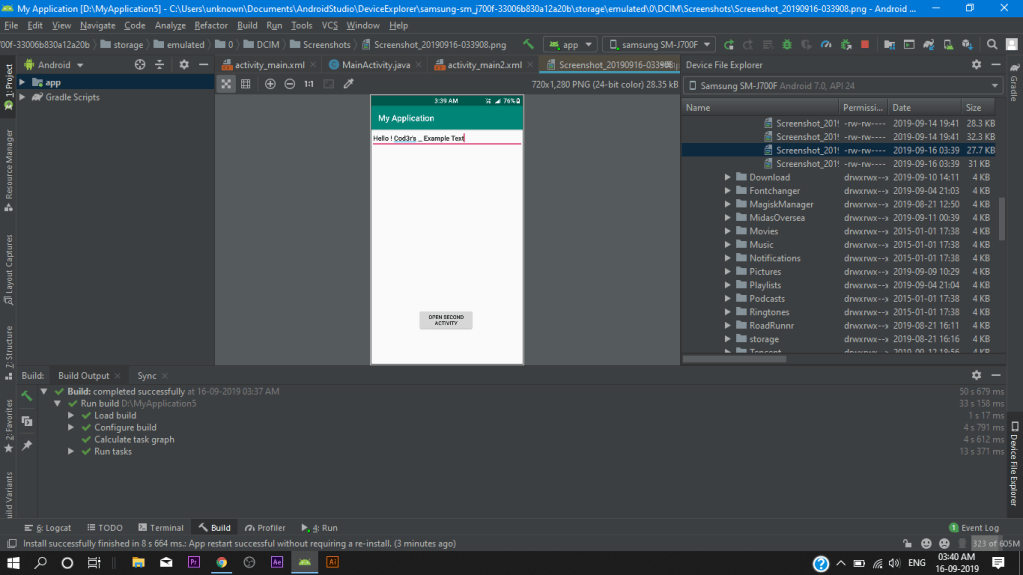
How To Pass Strings To Other Activity Android Studio

what you will learn in this lesson

how to pass strings between activities
Top back Button on second Activity As Result
TUTORIAL LEVEL- 

Rating: 1 out of 5.

So in this tutorial we have to use intent.putExtra class to pass strings between activities

Activity Main.XML

<?xml version="1.0" encoding="utf-8"?>
<RelativeLayout xmlns:android="http://schemas.android.com/apk/res/android"
    xmlns:app="http://schemas.android.com/apk/res-auto"
    xmlns:tools="http://schemas.android.com/tools"
    android:layout_width="match_parent"
    android:layout_height="match_parent"
    tools:context=".MainActivity">

    <EditText
        android:id="@+id/et"
        android:layout_width="match_parent"
        android:layout_height="wrap_content"

        android:hint="Enter desired Text here" />

    <Button
        android:id="@+id/btn"
        android:layout_width="wrap_content"
        android:layout_height="wrap_content"
        android:layout_below="@+id/et"
        android:layout_alignParentStart="true"
        android:layout_alignParentLeft="true"
        android:layout_alignParentEnd="true"
        android:layout_alignParentRight="true"
        android:layout_marginStart="111dp"
        android:layout_marginLeft="111dp"
        android:layout_marginTop="387dp"
        android:layout_marginEnd="116dp"
        android:layout_marginRight="116dp"
        android:gravity="center_horizontal"
        android:text="open second Activity" />
</RelativeLayout>

Second Activity.XML

<?xml version="1.0" encoding="utf-8"?>
<RelativeLayout xmlns:android="http://schemas.android.com/apk/res/android"
    xmlns:app="http://schemas.android.com/apk/res-auto"
    xmlns:tools="http://schemas.android.com/tools"
    android:layout_width="match_parent"
    android:layout_height="match_parent"
    tools:context=".Main2Activity">


    <TextView
        android:id="@+id/textView"
        android:layout_width="match_parent"
        android:layout_height="wrap_content"
        android:text="HEelooow"
        android:textSize="40dp"
        android:gravity="center_horizontal"
        />

</RelativeLayout>

Main Activity.JAVA

package com.example.myapplication;

import androidx.appcompat.app.AppCompatActivity;

import android.content.Intent;
import android.os.Bundle;
import android.view.View;
import android.widget.Button;
import android.widget.EditText;

public class MainActivity extends AppCompatActivity {
    private EditText et;
    private Button btn;
 public static final String EXTRA_TEXT="com.example.myapplication.EXTRA_TEXT";

    @Override
    protected void onCreate(Bundle savedInstanceState) {
        super.onCreate(savedInstanceState);
        setContentView(R.layout.activity_main);

         btn=(Button)findViewById(R.id.btn);
         btn.setOnClickListener(new View.OnClickListener() {
             @Override
             public void onClick(View view) {
                 openActivity();
             }
         });
}

       public void openActivity(){
        EditText editText=(EditText)findViewById(R.id.et);
        String text = editText.getText().toString();

        Intent intent= new Intent(this,Main2Activity.class);
        intent.putExtra(EXTRA_TEXT, text);
                startActivity(intent);
    }

}

Second Activity.JAVA

package com.example.myapplication;

import androidx.appcompat.app.AppCompatActivity;

import android.content.Intent;
import android.os.Bundle;
import android.widget.TextView;

public class Main2Activity extends AppCompatActivity {

    @Override
    protected void onCreate(Bundle savedInstanceState) {
        super.onCreate(savedInstanceState);
        setContentView(R.layout.activity_main2);

        Intent intent = getIntent();
        String text =intent.getStringExtra(MainActivity.EXTRA_TEXT);

        TextView textView=(TextView)findViewById(R.id.textView);
        textView.setText(text);
    }
}

that’s all for today’s tutorial guys if you like this tips then share this post.

Click Button Change Activity

  • in this post you will learn how use OnClickListner in your .java project in Android studio
  • and open an activity with that button using OnClickListner method

Hello Coder’s welcome to my first post

this project will look something like this

Second Activity

so As you can see above guys i have created a app example of the onclicklistner method So Lets quickly get to the Tutorial.

Tutorial level

Rating: 1 out of 5.

Main Activity.Xml

<?xml version="1.0" encoding="utf-8"?>
<androidx.constraintlayout.widget.ConstraintLayout xmlns:android="http://schemas.android.com/apk/res/android"
    xmlns:app="http://schemas.android.com/apk/res-auto"
    xmlns:tools="http://schemas.android.com/tools"
    android:layout_width="match_parent"
    android:layout_height="match_parent"
    tools:context=".MainActivity"
    android:background="@android:color/holo_blue_bright">

    <TextView
        android:id="@+id/tv1"
        android:layout_width="wrap_content"
        android:layout_height="wrap_content"
        android:layout_alignParentStart="true"
        android:layout_alignParentLeft="true"
        android:layout_alignParentTop="true"
        android:layout_alignParentEnd="true"
        android:layout_alignParentRight="true"
        android:layout_alignParentBottom="true"
        android:gravity="center_horizontal"
        android:shadowColor="#000A0505"
        android:text="Hello Coder's"
        android:textSize="40sp"
        app:layout_constraintBottom_toBottomOf="parent"
        app:layout_constraintEnd_toEndOf="parent"
        app:layout_constraintHorizontal_bias="0.431"
        app:layout_constraintStart_toStartOf="parent"
        app:layout_constraintTop_toTopOf="parent"
        app:layout_constraintVertical_bias="0.123" />

    <TextView
        android:id="@+id/tv2"
        android:layout_width="wrap_content"
        android:layout_height="wrap_content"
        android:text="this is activity 1"
        android:textSize="20sp"
        app:layout_constraintBottom_toBottomOf="parent"
        app:layout_constraintEnd_toEndOf="parent"
        app:layout_constraintHorizontal_bias="0.0"
        app:layout_constraintStart_toStartOf="@+id/tv1"
        app:layout_constraintTop_toBottomOf="@+id/tv1"
        app:layout_constraintVertical_bias="0.288" />

    <Button
        android:id="@+id/btn"
        android:layout_width="wrap_content"
        android:layout_height="wrap_content"
        android:background="#3F51B5"
        android:text="second Activity"
        app:layout_constraintBottom_toBottomOf="parent"
        app:layout_constraintEnd_toEndOf="@+id/tv2"
        app:layout_constraintHorizontal_bias="0.498"
        app:layout_constraintStart_toStartOf="parent"
        app:layout_constraintTop_toBottomOf="@+id/tv2"
        app:layout_constraintVertical_bias="0.565" />
</androidx.constraintlayout.widget.ConstraintLayout>

Second Activity.Xml

<?xml version="1.0" encoding="utf-8"?>
<androidx.constraintlayout.widget.ConstraintLayout xmlns:android="http://schemas.android.com/apk/res/android"
    xmlns:app="http://schemas.android.com/apk/res-auto"
    xmlns:tools="http://schemas.android.com/tools"
    android:layout_width="match_parent"
    android:layout_height="match_parent"
    android:background="#090505"
    tools:context=".second_activity">

    <TextView
        android:id="@+id/tv"
        android:layout_width="wrap_content"
        android:layout_height="wrap_content"
        android:layout_marginStart="155dp"
        android:layout_marginLeft="155dp"
        android:layout_marginTop="165dp"
        android:layout_marginEnd="115dp"
        android:layout_marginRight="115dp"
        android:layout_marginBottom="419dp"
        android:background="#4CAF50"
        android:text="This is second activity!"
        android:textSize="40dp"
        app:layout_constraintBottom_toBottomOf="parent"
        app:layout_constraintEnd_toEndOf="parent"
        app:layout_constraintHorizontal_bias="0.581"
        app:layout_constraintStart_toStartOf="parent"
        app:layout_constraintTop_toTopOf="parent"
        app:layout_constraintVertical_bias="0.514" />

    <TextView
        android:id="@+id/textView"
        android:layout_width="wrap_content"
        android:layout_height="wrap_content"
        android:layout_marginTop="60dp"
        android:layout_marginBottom="68dp"
        android:background="#4CAF50"
        android:text="Hello Coders"
        android:textSize="35sp"
        app:layout_constraintBottom_toTopOf="@+id/tv"
        app:layout_constraintEnd_toEndOf="parent"
        app:layout_constraintStart_toStartOf="parent"
        app:layout_constraintTop_toTopOf="parent" />
</androidx.constraintlayout.widget.ConstraintLayout>

Main Activity.Java

package com.example.myapplication;

import androidx.appcompat.app.AppCompatActivity;

import android.content.Intent;
import android.os.Bundle;
import android.view.View;
import android.widget.Button;
import android.widget.TextView;

public class MainActivity extends AppCompatActivity {
   //define variable here//

    private TextView txt1,txt2;

    private Button button;
   /* we have two variable here as yo can see above
   1.TextView as txt1 and txt2
   2.Button as button*/

    @Override
    protected void onCreate(Bundle savedInstanceState) {
        super.onCreate(savedInstanceState);
        setContentView(R.layout.activity_main);
      /*then we have to associate the corresponding id's
         to xml and java as you can see below*/


        txt1=(TextView)findViewById(R.id.tv1);
        txt2=(TextView)findViewById(R.id.tv2);
        button=(Button)findViewById(R.id.btn);

         //then we will ad a onClickListener to our button//

        button.setOnClickListener(new View.OnClickListener() {
            @Override
            public void onClick(View view) {
                OpenSecond();
            }
        });

    }
    //we will create a method called  open second ();//

    public void OpenSecond(){
        Intent intent=new Intent(this,second_activity.class);
        startActivity(intent);
    }
}
       //this is the End of Main Activity//

second Activity.Java

package com.example.myapplication;

import androidx.appcompat.app.AppCompatActivity;

import android.os.Bundle;

public class second_activity extends AppCompatActivity {

    @Override
    protected void onCreate(Bundle savedInstanceState) {
        super.onCreate(savedInstanceState);
        setContentView(R.layout.second_activity);
    }
}
   //That's is for Today's Tutorial Subscribe For more coding tips like this//

So That’s All for this tutorial if you like this post make sure to hit the subsrctibe button cause i am gonna start a series of android studio